Worksheet 31 UKM
Starting Wall following
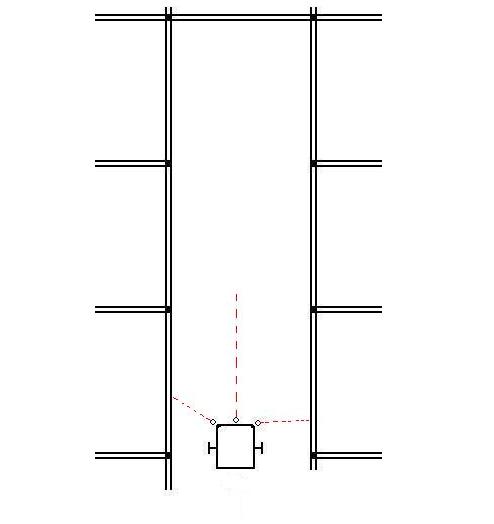
Purpose
Using a UKMARS robot:(for WHAM click here)
This is to explore:
- what a wall-follower does.
- its sensors
- how to go smoothly straight down a corridor
- how to stop, when you need to make a turn
and shows you how to program it.
This Task
You should explore the sensors using the sample program HereAnd make the two motor speeds adjust the distance from the left wall so that the robot
goes down smoothly the centre of a long corridor,
and stops when it should.
It should stop when it comes to a wall in front,
- Or (Extension) when a left-hand turn becomes possible
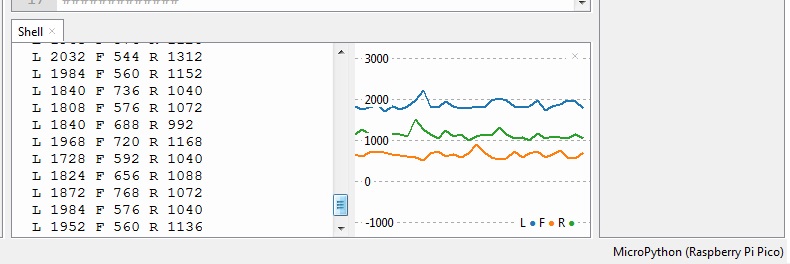
You can view the printouts from the program, using Thonny (left, front and right sensors)
If you enable its plotter you'll see a graph of the three sensor readings,
which will change as you move the robot between the walls.
Step1: Download the sample program and run it on your UKMARS robot
Download WKS31U.py
Copy it to your Pico UKMARS Robot as file "main.py"
You'll need the UKMARS module as well
The file UKMARS.py should be on your Pico, but if not, download it here
Step 2: Run the program but don't press the button.
You will see the 3 sensor readings for different positions in the corridor.
Before the button is pressed, the program prints the values instead of running the motors.
Put your robot in between the two walls, and observe the readings as you move the robot left and right.
You'll see that the reading is higher the closer the wall is.
Also the left and right hand sensor are pointing slightly forwards
The sample program will steer using the left hand sensor reading only.
Take note of the left hand reading, when in the middle of a corridor
- you'll need it later (as target)
It should have about 45mm between the left wheel and the wall
Step3: Find function corridor(), where the motor speeds are calculated from the sensor reading.
This function detects the left wall distance, and sets the left and right speeds accordingly
################
#  corridor()  #
################
def corridor():   # go down the corridor

    while True:                   # this version doesn't stop
        (left,front,right)= ReadWALLS()  # read all 3 walls
        target = 3500             # required left wall distance
        mult = 0.002              # steering strength

        # statements to end the loop (not used till step4)
        #if (left <1000):
        #    break                 # exit loop if no left wall
        #if (front >5000):
        #    break                 # exit loop if front wall

        error = left - target     # subtract target
        error = error * mult      # amount of steering

        lspeed = speed + error    # calsulate motor speeds
        rspeed = speed - error
        RightMotor.speed(rspeed)  # send speeds to motors
        LeftMotor.speed(lspeed)

        time.sleep(0.01)          # do a hundred readings per second
and also adjust mult for the strength of steering.
The speed is set at the start of the program (line15).
If it snakes left and right, then mult is too high
If it steers too gently then mult is too low
This will need to be re-adjusted if you change the speed
Step4: Make it detect the end of the corridor.
This is when a wall is detected in front,
Insert a conditional break statement to end the While loop,
depending on the FWall sensor value:
        if (front >5000):
            break                 # exit loop if front wall
Step4a: detect a gap in the left wall as the end of the corridor.
It should now stop corridor() either on a front wall, or an opportunity to turn left
Use another break inside the loop to end on the LWall sensor value
        if (left <1000):
            break                 # exit loop if no left wall
Step5: Now write a function to cause a U_turn
This is needed to turn round in a dead-end
Warning: the speeds need to be adjusted for your robot
# function to spin right 180 degrees
def U_turn():
    lspeed = 30      # adjust to suit
    rspeed = -30     # adjust to suit
    RightMotor.speed(rspeed)
    LeftMotor.speed(lspeed)
    time.sleep(0.45)  # adjsut to suit
    RightMotor.stop()
    LeftMotor.stop()
    time.sleep(0.1)
The motor speeds and delay time should be adjusted for a controlled spin of 180 degrees
Step 6: Make the main program alternate between corridor and U-turn
Use an unconditional while loop to make it call
- the corridor and
- U-turn function in sequence
You will have to adjust the front distance at which corridor() exits,
and the amount of spin in the U_turn()
while True:
    corridor()
    U_turn()       # spin right 180 degrees
Extension: make corridor take left turns
Limit the left speed value so it never goes less than about 10. (maybe 15)
This will make "corridor" curve gently round the left corners,
rather than turning sharply and hitting the corner.
Extension 2: make "target" set automatically During the first part of the program, the loop awaiting the button press,
You could set "target" from a sensor reading...
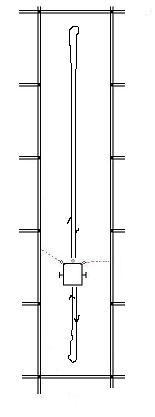
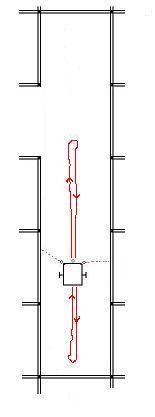
Test tracks:
| Corridor() stops on Front Sensor |
Corridor() stops on Left Sensor | |
 |  | |
(10/1/2022)
# Filename to be printed
Thisfile = "WKS31U.py"
#Date  22/2/2022

#############
#  imports  #
#############
from machine import Pin, PWM, ADC
import time, utime
from UKMARS import *   # motors and wall sensors and button

##########
#  data  #
##########
speed = 20             # speed in corridor
mult = 0.002          # amount of steering in corridor

# motors
LeftMotor  = Motor("L")    # set up left motor object
RightMotor = Motor("R")  # set up right motor object
RightMotor.stop()
LeftMotor.stop()

################
#  corridor()  #
################
def corridor():   # go down the corridor

    while True:                   # this version doesn't stop
        (left,front,right)= ReadWALLS()  # read all 3 walls
        target = 3500             # required left wall distance
        mult = 0.002              # steering strength

        # statements to end the loop (not used till step4)
        #if (left <1000):
        #    break                 # exit loop if no left wall
        #if (front >5000):
        #    break                 # exit loop if front wall

        error = left - target     # subtract target
        error = error * mult      # amount of steering

        lspeed = speed + error    # calsulate motor speeds
        rspeed = speed - error
        RightMotor.speed(rspeed)  # send speeds to motors
        LeftMotor.speed(lspeed)

        time.sleep(0.01)          # do a hundred readings per second


##########
#  main  #
##########
print(Thisfile)
print("Prints all 3 wall sensor values")

# await right pushbutton
while Button.value()==0:
    #print("loop")
    count = 0
    (left,front,right)= ReadWALLS()  # read all 3 walls
    print("L",left,"F",front,"R",right)

    time.sleep(0.1)
# await pushbutton release
while Button.value()==1:
    pass

led.on()

# run the corridor, then stop
corridor()
led.off()
RightMotor.stop()
LeftMotor.stop()
22/2/2022