Worksheet 8
A smoother Line-follower program
Purpose
This follows on from Worksheet 7,- and shows you how the motor speeds can be adjusted in a line follower program,
both by setting speeds for zones, and by maths from the sensor reading
Task
You should try out the sample program WKS8.txtAnd set up different motor speeds to follow the line well,
following as closely and as fast as you can.
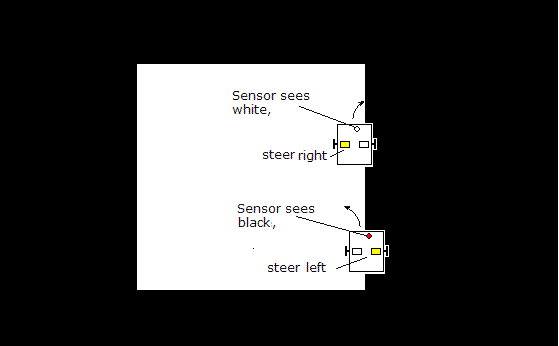
The robot steers by using different speeds for the left and right motors.
The single sensor gives a reading of the reflection of the white line (as in worksheet 7).
It therefore follows the right edge of the white line.
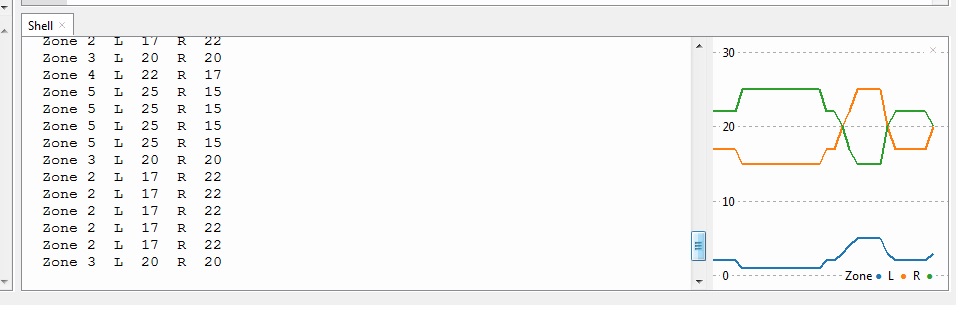
You should view the printouts from the program, using Thonny (zone, left and right speeds)
If you enable the plotter you'll see a graph of the zone, and the two speeds,
which will change as you move the sensor over the line.
Step1: Download the sample program and run it on your UKMARSBOT
Download WKS8.py
You'll need the UKMARS module as well
The file UKMARS.py should be on your Pico, but if not, download it here
Please make sure it's the up to date version (13/11/2021)
There is an updated date in a comment near the top
Put your robot on the line before you switch on.
Switch on and observe the right hand sensor bar LED as you move the robot over the line,
It should reliably light when the right hand sensor is over the line
Step 2: Run the program but don't press the button.
You will see the speeds that will be used in different positions over the line.
Before the button is pressed, the program prints the values instead of running the motors.
The sample program calculates motor speeds by setting a "zone" for each range of sensor values.
Zone 1 is 0-20, Zone 2 is 21-40 Zone3 is 41-60 etc.etc.
The zone is then used to set the two motor speeds (left and right).
The motor speeds steer the robot back to the line edge.
Sample Printout:
WKS8.py
Zone 1  L  18  R  22
Zone 2  L  19  R  21
Zone 2  L  19  R  21
Zone 3  L  20  R  20
Zone 4  L  21  R  19
Zone 4  L  21  R  19
Zone 5  L  22  R  18
Step3: Find function setspeeds() which is where the motor speeds are set for each zone.
This function detects which zone the robot is in, and sets the left and right speeds accordingly
def setspeeds(val): # val is the input (=rsense reading)
    global zone,lspeed,rspeed   #allows this function to set zone and speeds
    if val < 20:
        zone= 1
        lspeed=18  # adjust to suit
        rspeed=22  # adjust to suit
    elif val < 40:
        zone= 2
        lspeed=19  # adjust to suit
        rspeed=21  # adjust to suit
Step4: make it steer more in zones 1 and 5,
- these are the zones when it's away from the middle
- you could make the slow speed slower to give stronger steering
def setspeeds(val): # val is the input (=rsense reading)
    global zone,lspeed,rspeed   #allows this function to set zone and speeds
    if val < 20:
        zone= 1
        lspeed=10  # adjust to suit
        rspeed=20  # adjust to suit
##etc
    else:
        zone= 5
        lspeed=20  # adjust to suit
        rspeed=10  # adjust to suit
Step5: Now try making only zone 3 speed faster
    elif val < 60:
        zone= 3
        lspeed=40  # adjust to suit
        rspeed=40  # adjust to suit
This will make it go faster on the straight than the curves
Extension 1: See if you can calculate the zone from the sensor reading using Python maths
try rsense divided by 20?
you will have to convert it from a real number with decimal digits,
to an "integer" using int( calculated value)
| sens | zone | |||
|---|---|---|---|---|
| <20 | 1 | |||
| 20-39 | 2 | |||
| 40-59 | 3 | |||
| 60-79 | 4 | |||
| 80-99 | 5 |
Extension 2: See if you can calculate the speeds directly from the sensor reading
This would do away with "zones". You will need to have a basic speed, say 20,
and calculate an amount (called error)by which the rsense value is greater than 50.
- use this amount to increase the left motor speed above the basic speed,
- and decrease the right motor speed below the basic speed,
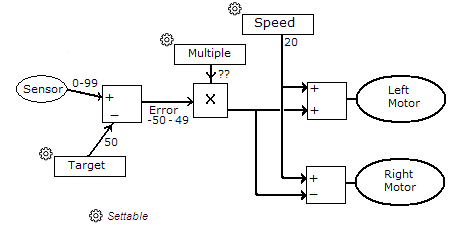
In the diagram above,the error has been calculated as
- the difference between the received sensor reading and the Target sensor reading
- it's then multiplied by a (small) constant,
- and used to control the amount of steering.
Note that if multiple is zero,
then the left and right motors always have the same speed and there is no steering!
(30/11/2021)
  # Filename to be printed
Thisfile = "WKS8.py"
# History
# speed 20
#23/11/2021 simpler Python


#### imports
from machine import Pin, PWM, ADC,UART
import time, utime
from UKMARS import *   # SW1, Button, lfront , rfront, Motor

#############
#   Data    #
#############
# motors
LeftMotor  = Motor("L")    # set up left motor object
RightMotor = Motor("R")    # set up right motor object
zone = 1                   # used to say what zone we are in
                           # zone 3 is the middle, zone 1 is far right
                           # zone 5 is far left etc
lspeed=0                   # speed of left motor
rspeed=0                   # speed of right motor


#======== Program starts here =======================
print(Thisfile)

RightMotor.stop()     #stop the motors just in case
LeftMotor.stop()

##################
#   setspeeds    #
##################
# this function sets the motor speeds from the sensor reading
def setspeeds(val): # val is the input (=rsense reading)
    global zone,lspeed,rspeed   #allows this function to set zone and speeds
    if val < 20:
        zone= 1
        lspeed=18  # adjust to suit
        rspeed=22  # adjust to suit
    elif val < 40:
        zone= 2
        lspeed=19  # adjust to suit
        rspeed=21  # adjust to suit
    elif val < 60:
        zone= 3
        lspeed=20  # adjust to suit
        rspeed=20  # adjust to suit
    elif val < 80:
        zone= 4
        lspeed=21  # adjust to suit
        rspeed=19  # adjust to suit
    # otherwise
    else:
        zone= 5
        lspeed=22  # adjust to suit
        rspeed=18  # adjust to suit

# pre race set-up to print the workings, and check everything
while Button.value()==0:    # wait for Start button button to be pressed
    rsense = calibr(rfront.read_u16()) # read right front sensor
    setspeeds(rsense)       # sets up motor speeds from rsense
    print ("Zone",zone," L ",lspeed," R ",rspeed)  # print the zone and speeds
    time.sleep(0.1)

# main loop to actually run the track
while True:
    rsense = calibr(rfront.read_u16()) # read right front sensor
    setspeeds(rsense)        # sets up motor speeds from rsense
    LeftMotor.speed(lspeed)  # set left speed
    RightMotor.speed(rspeed) # set right speed

    time.sleep(0.001)        # wait 1 millisecond

# end of loop
# never gets here