Worksheet 9
2-sensor Mathematical Line-follower program
Purpose
This follows on from Worksheet 8,It shows you how you can use both sensors to get a better position over the line,
and how to calculate an "error" from both, for steering with.
- And if it falls off the line, you can also keep a useful error value.
- also how to get a more stable robot using derivative
Task
You should try out the sample program WKS9.txtAnd adjust the calculation of the motor speeds so that the robot follows the line well,
The two sensors read the reflection of the white line.
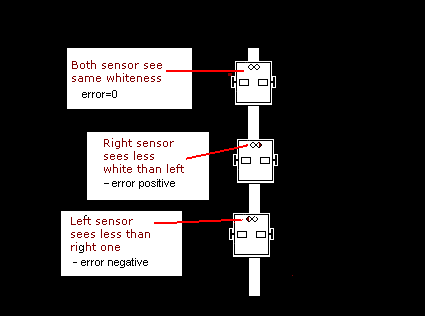
We calculate the position using the two readings. If both the same we must be in the right place.
It therefore follows the middle of the white line.
If the left is brighter, we must be too far to the right.
It should therefore slow the left motor and speed up the right.
If the right is brighter, we must be too far to the left.
It should therefore speed up the left motor and slow down the right.
Step1: Download the sample program and run it on your UKMARSBOT
Download WKS9.py
You'll need the UKMARS module as well
The file UKMARS.py should be on your Pico, but if not, download it here
Please make sure it's the up to date version (14/4/2022)
There is an updated date in a comment near the top
Put your robot on the line before you switch on.
Switch on and observe the printout in the Thonny shell window as you move the robot over the line,
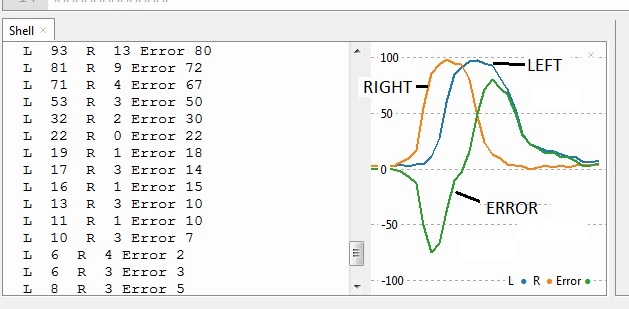
It should show both readings near 100 at the centre of the line.
Step 2: Run the program but don't press the button.
You will see the sensor readings for different positions over the line.
Before the button is pressed, the program prints the values and doesn't run the motors.
Step3: Find function setspeeds() which is where the motor speeds are set from the "error".
This function uses the sensor reading difference, (error) and sets the left and right speeds accordingly
Multiplier "mult" is declared outside the function in the data section of the program.
def setspeeds(ls,rs): # ls and rs are the sensor readings
    global lspeed,rspeed   # Python to let this function change speeds
    global error,OldError,mult      # to allow changing error

    error = ls-rs          # if on-line,

    val = error *mult      # adjust steering amount

    ## Derivative calculations, using last-time's value
    #change = (error - OldError)
    ## add in the derivative to val
    #val = val + (change * dfactor)/10

    lspeed = speed - val   # speed of left motor
    rspeed = speed + val   # speed of right motor
    OldError = error       # keep track of this error for later
    return (error)
Run the program and press the button
Notice what happens when you pull it off the line
Try speed =0 for a "stationary linefollower"
you can also set the speeds with the switches.
See below
| SW1 | SW2 | SW3 | SW4 | Speed |
|---|---|---|---|---|
| Off | Off | Off | Off | 0 |
| On | Off | Off | Off | 10 |
| Off | On | Off | Off | 20 |
| On | On | Off | Off | 30 |
| Off | Off | On | Off | 40 |
| . . . | . . . | . . . | . . . | Other speeds (binary maths) |
| On | On | On | On | As set in program (line 20) |
Write down in your exercise book the highest speed you can set without it falling off at the corners!
Step4: make it detect fall-off, and keep steering when off the line
- this is when both sensors give less than 20
- make it light the LED when fallen off
def setspeeds(ls,rs): # ls and rs are the sensor readings
    global lspeed,rspeed    # lets this function change the speeds
    global error,OldError,mult  # allows changing error,OldError etc

    if (ls >20 or rs >20):
        led.off()
        error = ls-rs      # only if on-line,
    else:
        led.on()
        # Off-line, so boost error
        if error >0:
            error = 60
        else:
            error = -60

    val = error *mult         # adjust steering amount

    ## Derivative calculations, using last-time's value
    #change = (error - OldError)
    ## add in the derivative to val
    #val = val + (change * dfactor)/10

    lspeed = speed - val      # speed of left motor
    rspeed = speed + val      # speed of right motor
    OldError = error       # keep track of this error for later
    return (error)
Try it with speed = zero, and manually dragging it off the line
Do you notice any improvement?
Step5: Use "Derivative" to increase stability
This means calculating the rate at which the error is increasing.
Do this by subtracting the previous value (from last time round the loop)
from the new value.
This number, when added to the current value, gives a prediction of
the value at some point in the future.
Use this predicted value instead of "error" and you are using derivative!
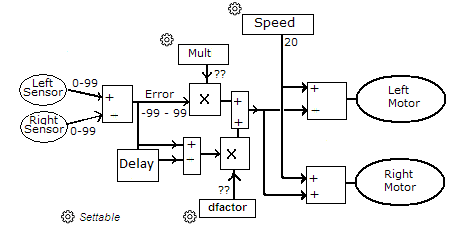
In the diagram above,the error has been calculated as
- the difference between the left and right sensor values
- it's then multiplied by a (small) constant (factor),
- and used to control the amount of steering.
The derivative is calculated from the change in error
from the old (previous) reading to the current reading.
This change is multiplied by another factor, (dfactor) and added in to the result
which then affects the motor speeds.
Enable the derivative part of the sample program.
remove the first '#' at the start of each line below:
    ## Derivative calculations, using last-time's value
    #change = (error - OldError)
    ## add in the derivative to val
    #val = val + (change * dfactor)/10
Start off using dfactor = 10 (at line 25)
(11/1/2022)
# Filename to be printed
Thisfile = "WKS9.py"
# History
#14/12/2021 starter
# 11/1/2022 OldError
# 13/1/2022 Switches on button-press, derivative inclusion

#### imports
from machine import Pin, PWM, ADC,UART
import time, utime
from UKMARS import *   # SW1, Button, lfront , rfront, Motor

#############
#   Data    #
#############
# motors
LeftMotor  = Motor("L")    # set up left motor object
RightMotor = Motor("R")    # set up right motor object
lspeed=0                   # speed of left motor
rspeed=0                   # speed of right motor
speed = 0                  # but see readswitches below
error = 0                  # calculated from sensors
OldError = 0               # used to track previous error
change =0                  # calculated from sensors
mult = 0.5                 # used for tuning
dfactor = 0                # used for tuning

#################
#  setspeeds()  #
#################
'''
 Function to calculate error and motor speeds from the sensor values
'''
def setspeeds(ls,rs): # ls and rs are the sensor readings
    global lspeed,rspeed    # lets this function change the speeds
    global error,OldError,mult   # allows changing error,OldError etc

    error = ls-rs          # if on-line,

    val = error *mult      # adjust steering amount

    ## Derivative calculations, (not used yet)
    #change = (error - OldError)
    ## add in the derivative to val
    #val = val + (change * dfactor)/10

    lspeed = speed - val   # speed of left motor
    rspeed = speed + val   # speed of right motor
    OldError = error       # keep track of this error for later
    return (error)

##########
#  main  #
##########

RightMotor.stop()     #stop the motors just in case
LeftMotor.stop()

print(Thisfile)

# pre race set-up to print the workings, and check everything
while Button.value()==0:    # wait for Start button button to be pressed
    lsense = calibl(lfront.read_u16()) # read left front sensor
    rsense = calibr(rfront.read_u16()) # read right front sensor

    setspeeds(lsense,rsense)  # set up error from readings

    print ("L ",lsense," R ",rsense,"Error",error)  # print the sensor values and error
    time.sleep(0.1)     # wait 100 milliseconds

swval = readswitches()   # read value of 4-way switch
if swval != 150 :  # ignore if ON,ON,ON,ON
    speed = swval
    pass
print("Speed="+str(speed))

# main loop to actually run the track
while True:
    lsense = calibl(lfront.read_u16()) # read left front sensor
    rsense = calibr(rfront.read_u16()) # read right front sensor

    setspeeds(lsense,rsense)  # set up speeds from readings

    LeftMotor.speed(lspeed)  # set left motor speed
    RightMotor.speed(rspeed) # set right motor speed

    time.sleep(0.01)        # wait 10 milliseconds

# end of loop
# never gets here
WKS9x.py - Sample program, with all the above changes made. view as text.